Filter
Firewall filters are used to allow or block specific packets forwarded to your local network, originating from your router, or destined for the router.
There are two methods to set up filtering:
- Allow specific traffic and drop everything else.
- Drop only malicious traffic, everything else is allowed.
Both methods have pros and cons, for example, from a security point of view the first method is much more secure, but requires administrator input whenever traffic for a new service needs to be accepted. This strategy provides good control over the traffic and reduces the possibility of a breach because of service misconfiguration.
On the other hand, when securing a customer network, it would be an administrative nightmare to accept all possible services that users may use. Therefore, careful planning of the firewall is essential in advanced setups.
A firewall filter consists of three predefined chains that cannot be deleted:
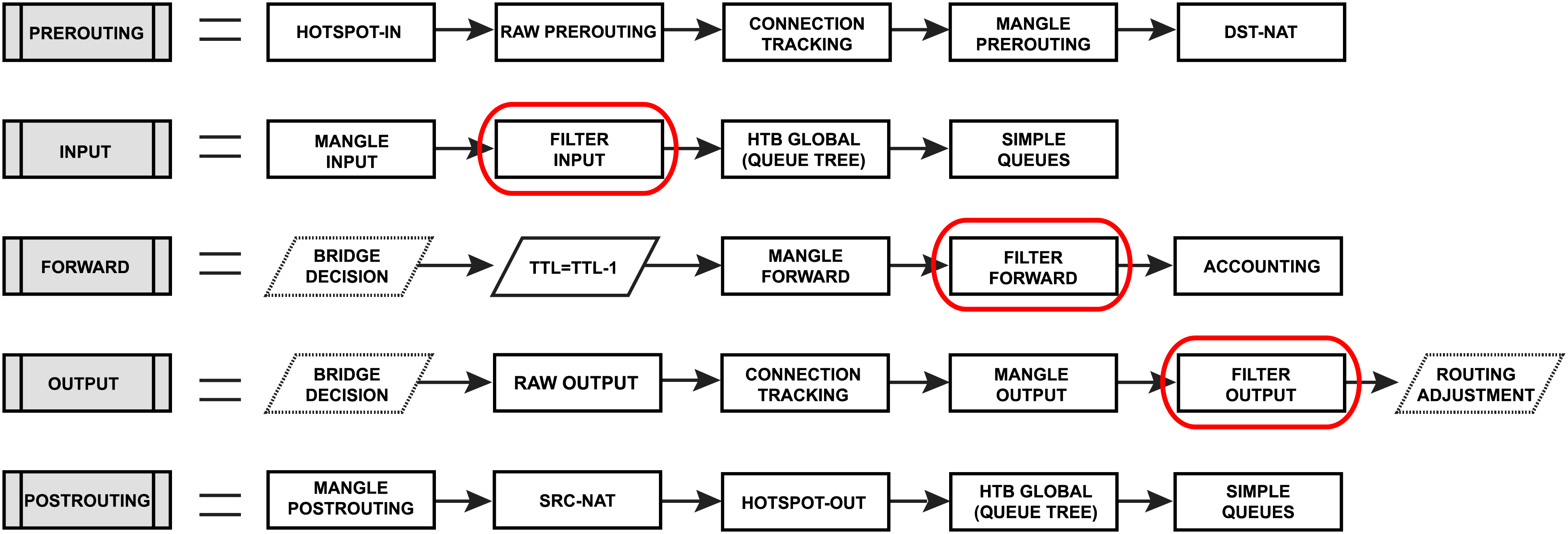
- input - used to process packets entering the router through one of the interfaces with the destination IP address which is one of the router's addresses. Packets passing through the router are not processed against the rules of the input chain.
- forward - used to process packets passing through the router.
- output - used to process packets originating from the router and leaving it through one of the interfaces. Packets passing through the router are not processed against the rules of the output chain.
Firewall filter configuration is accessible from the /ip/firewall/filter menu for IPv4 and the /ipv6/firewall/filter menu for IPv6.
Firewall Example
Let's look at a basic firewall example to protect the router itself and clients behind the router, for both IPv4 and IPv6 protocols.
IPv4 firewall
Protect the router itself
Rules of thumb followed to set up the firewall:
- Work with
newconnections to decrease the load on a router. - Accept what you need.
dropeverything else,log=yescould be set to log some attackers, but keep in mind that it may add some load to the CPU on heavy attacks.
We always start by accepting already known and accepted connections, so the first rule should be to accept "established" and "related" connections.
/ip/firewall/filter
add action=accept chain=input comment="default configuration" connection-state=established,related
Now we can proceed by accepting some new connections, in our example we want to allow access to the ICMP protocol from any address and everything else only from 192.168.88.2-192.168.88.254 address range. For that we create an address list and two firewall rules.
/ip/firewall/address-list
add address=192.168.88.2-192.168.88.254 list=allowed_to_router
/ip/firewall/filter
add action=accept chain=input src-address-list=allowed_to_router
add action=accept chain=input protocol=icmp
And lastly we drop everything else:
add action=drop chain=input
The complete set of just created rules:
/ip/firewall/filter
add action=accept chain=input comment="default configuration" connection-state=established,related
add action=accept chain=input src-address-list=allowed_to_router
add action=accept chain=input protocol=icmp
add action=drop chain=input
/ip/firewall/address-list
add address=192.168.88.2-192.168.88.254 list=allowed_to_router
Protect the LAN devices
The concept of protecting the users is very similar, except that in this case we are blocking unwanted traffic and accepting everything else.
At first we will create an address-list with the name "not_in_internet" which we will use for the firewall filter rules:
/ip/firewall/address-list
add address=0.0.0.0/8 comment=RFC6890 list=not_in_internet
add address=172.16.0.0/12 comment=RFC6890 list=not_in_internet
add address=192.168.0.0/16 comment=RFC6890 list=not_in_internet
add address=10.0.0.0/8 comment=RFC6890 list=not_in_internet
add address=169.254.0.0/16 comment=RFC6890 list=not_in_internet
add address=127.0.0.0/8 comment=RFC6890 list=not_in_internet
add address=224.0.0.0/4 comment=Multicast list=not_in_internet
add address=198.18.0.0/15 comment=RFC6890 list=not_in_internet
add address=192.0.0.0/24 comment=RFC6890 list=not_in_internet
add address=192.0.2.0/24 comment=RFC6890 list=not_in_internet
add address=198.51.100.0/24 comment=RFC6890 list=not_in_internet
add address=203.0.113.0/24 comment=RFC6890 list=not_in_internet
add address=100.64.0.0/10 comment=RFC6890 list=not_in_internet
add address=240.0.0.0/4 comment=RFC6890 list=not_in_internet
add address=192.88.99.0/24 comment="6to4 relay Anycast [RFC 3068]" list=not_in_internet
Brief firewall filter rule explanation:
- Packets with connection-state=established,related are added to FastTrack for faster data throughput, the firewall will work with new connections only.
- Drop invalid connections and log them with prefix "invalid".
- Drop attempts to reach not public addresses from your local network, apply address-list=not_in_internet before, "bridge" is the local network interface, log=yes attempts with prefix "!public_from_LAN".
- Drop incoming packets that are not NATed, ether1 is a public interface, log attempts with "!NAT" prefix.
- Jump to ICMP chain to drop unwanted ICMP messages.
- Drop incoming packets from the Internet, which are not public IP addresses, ether1 is a public interface, log attempts with prefix "!public".
- Drop packets from LAN that do not have LAN IP, 192.168.88.0/24 is the local network subnet.
/ip/firewall/filter
add action=fasttrack- chain=forward comment=FastTrack connection-state=established,related
add action=accept chain=forward comment="Established, Related" connection-state=established,related
add action=drop chain=forward comment="Drop invalid" connection-state=invalid log=yes log-prefix=invalid
add action=drop chain=forward comment="Drop tries to reach not public addresses from LAN" dst-address-list=not_in_internet in-interface= log=yes log-prefix=!public_from_LAN out-interface=!
add action=drop chain=forward comment="Drop incoming packets that are not NAT`ted" connection-nat-state=!dstnat connection-state=new in-interface=ether1 log=yes log-prefix=!NAT
add action=jump chain=forward protocol=icmp jump-target=icmp comment="jump to ICMP filters"
add action=drop chain=forward comment="Drop incoming from internet which is not public IP" in-interface=ether1 log=yes log-prefix=!public src-address-list=not_in_internet
add action=drop chain=forward comment="Drop packets from LAN that do not have LAN IP" in-interface= log=yes log-prefix=LAN_!LAN src-address=!192.168.88.0/24
Allow only needed ICMP codes in the "icmp" chain:
/ip/firewall/filter
  add chain=icmp protocol=icmp icmp-options=0:0 action=accept \
    comment="echo reply"
  add chain=icmp protocol=icmp icmp-options=3:0 action=accept \
    comment="net unreachable"
  add chain=icmp protocol=icmp icmp-options=3:1 action=accept \
    comment="host unreachable"
  add chain=icmp protocol=icmp icmp-options=3:4 action=accept \
    comment="host unreachable fragmentation required"
  add chain=icmp protocol=icmp icmp-options=8:0 action=accept \
    comment="allow echo request"
  add chain=icmp protocol=icmp icmp-options=11:0 action=accept \
    comment="allow time exceed"
  add chain=icmp protocol=icmp icmp-options=12:0 action=accept \
    comment="allow parameter bad"
  add chain=icmp action=drop comment="deny all other types"
IPv6 firewall
Protect the router itself
Very similar to IPv4 setup, except that we have to deal with more protocols required for IPv6 to function properly.
First, we create an address-list from which you allow access to the device:
/ipv6/firewall/address-list/add address=fd12:672e:6f65:8899::/64 list=allowed
Brief IPv6 firewall filter rule explanation:
- Work with new packets, accept established/related packets.
- Drop link-local addresses from the Internet(public) interface/interface-list.
- Accept access to a router from link-local addresses, accept multicast addresses for management purposes, accept your source address-list for router access.
- Drop anything else.
/ipv6/firewall/filter
add action=accept chain=input comment="allow established and related" connection-state=established,related
add chain=input action=accept protocol=icmpv6 comment="accept ICMPv6"
add chain=input action=accept protocol=udp port=33434-33534 comment="defconf: accept UDP traceroute"
add chain=input action=accept protocol=udp dst-port=546 src-address=fe80::/10 comment="accept DHCPv6-Client prefix delegation."
add action=drop chain=input in-interface=in_interface_name log=yes log-prefix=dropLL_from_public src-address=fe80::/10
add action=accept chain=input comment="allow allowed addresses" src-address-list=allowed
add action=drop chain=input
/ipv6/firewall/address-list
add address=fe80::/16 list=allowed
add address=xxxx::/48 list=allowed
add address=ff02::/16 comment=multicast list=allowed
In certain setups where the DHCPv6 relay is used, the src address of the packets may not be from the link-local range. In that case, the src-address parameter of rule #4 must be removed or adjusted to accept the relay address.
Protect the LAN devices
This step is more important than it is for IPv4. In IPv4 setups clients mostly have addresses from a local address range and are NATed to a public IP, that way they are not directly reachable from the public networks.
IPv6 is a different story. In most common setups, enabled IPv6 makes your clients available from the public networks, so proper firewall filter rules to protect your customers are mandatory.
In brief, very basic LAN protection should:
- Accept established/related and work with new packets.
- Drop invalid packets.
- Accept ICMPv6 packets.
- Accept new connections originated only from your clients to the public network.
- Drop everything else.
/ipv6/firewall/filter
add action=accept chain=forward comment=established,related connection-state=established,related
add action=drop chain=forward comment=invalid connection-state=invalid log=yes log-prefix=,invalid
add action=accept chain=forward comment=icmpv6 in-interface=!in_interface_name protocol=icmpv6
add action=accept chain=forward comment="local network" in-interface=!in_interface_name src-address-list=allowed
add action=drop chain=forward log-prefix=IPV6
Matchers
All matcher properties are common and listed here.
Actions
Tables below show list of filter specific actions and associated properties.
| Property | Description |
|---|---|
| action (action name; Default: accept) | accept - accept the packet. A packet is not passed to the next firewall rule.add-dst-to-address-list - add destination address to address list specified by the address-list parameteradd-src-to-address-list - add source address to address list specified by the address-list parameterdrop - silently drop the packetfasttrack-connection - processes packets from a connection using FastPath by enabling FastTrack for the connection. IPv4 only.jump - jumps to the user-defined chain specified by the value of the jump-target parameterlog - adds a message to the system log containing the following data: in-interface, out-interface, src-mac, protocol, src-ip:port->dst-ip:port and the length of the packet. After a packet is matched it is passed to the next rule in the list, similar to passthroughpassthrough - if a packet is matched by the rule, increases the counter and goes to the next rule (useful for statistics)reject - drops the packet and sends an ICMP reject message; this action allows ICMP reply specification, such as: prohibit or unreachable admin/host/network/portreturn - passes control back to the chain from where the jump took placetarpit - captures and holds TCP connections (replies with SYN/ACK to the inbound TCP SYN packet). IPv4 only. |
| hw-offload (no | yes; Default: yes) | Enables or disables FastTrack hardware offloading. Supported only on switches with FastTrack offloading and when action=fasttrack-connection is set. |
| reject-with (icmp-no-route | icmp-admin-prohibited | icmp-not-neighbour | icmp-address-unreachable | icmp-port-unreachable | tcp-reset | icmp-err-src-routing-header | icmp-headers-too-long ; Default: icmp-no-route) | Specifies the ICMP error to be sent back if the packet is rejected. Applicable if action=rejecticmp-no-route: sends an ICMP address no-route message. ICMP type 1, code 0icmp-admin-prohibited: sends an ICMP address prohibited message. ICMP type 1, code 1icmp-not-neighbour: sends an ICMP address not-member message. ICMP type 1, code 2icmp-address-unreachable: sends an ICMP address unreachable message. ICMP type 1, code 3icmp-port-unreachable: sends an ICMP port unreachable message. ICMP type 1, code 4tcp-reset: sends an ICMP message resetting a TCP connection. ICMP type 1, code 6icmp-err-src-routing-header: sends an ICMP Error in Source Routing Header message. ICMP type 1, code 7icmp-headers-too-long: sends an ICMP Headers too long message. ICMP type 1, code 8 |
RAW Filtering
The firewall RAW table allows selectively bypassing or dropping packets before connection tracking, that way significantly reducing the load on the CPU. The tool is very useful for DoS/DDoS attack mitigation.
RAW filter configuration is accessible from the /ip/firewall/raw menu for IPv4 and the /ipv6/firewall/raw menu for IPv6.
The RAW table does not have matchers that depend on connection tracking (like connection-state, layer7, etc.). If a packet is marked to bypass the connection tracking, packet de-fragmentation will not occur.
Also the RAW firewall can have rules only in two chains:
- prerouting - used to process any packet entering the router.
- output - used to process packets originating from the router and leaving it through one of the interfaces. Packets passing through the router are not processed against the rules of the output chain.
It has one specific action:
| Property | Description |
|---|---|
| action (action name; Default: accept) | notrack - do not send a packet to connection tracking. Useful when you still need to use regular firewall, but do not require connection tracking. |
Basic RAW Example
Let's assume that we have OSPF configuration, but due to connection tracking OSPF has adjacency problems. We can use RAW rules to fix this, by not sending OSPF packets to connection tracking.
/ip/firewall/raw
add chain=prerouting protocol=ospf action=notrack
add chain=output protocol=ospf action=notrack